Account: C330
Customer Information | |
Country | Japan Daily Spares and Machine orders |
Customer Name | Mycronic Assembly Solutions K.K. |
Delivery Address | Mycronic Assembly Solutions K.K. 1-9-25, Enokida, Hakata-Ku, Fukuoka, 812-0004 Japan |
Customer Number | C330 |
Contact Person | Junko Sonobe, Coordinator |
Email Address |
|
DHL Ex Works (Spares) | Ship on our account, file it in the excel that is JP folder. |
SPARES ORDERS:
- When receiving the picking list, create proforma, book via DHL, print labels
- Always check if there are any special delivery requirements (By 9am or 12pm or standard…etc)
- Shipments to SMT Japan are under EXW Incoterms
- Customer’s orders that Junko creates herself for her customers we ALWAYS ship to Japan office address
(see Delivery Address above), and NEVER to the customer’s address stated on the order/Packing list!
Task | Complete (Y\N) | Notes |
DHL booking and printing shipping labels |
|
|
Creating Proforma Invoice |
|
|
Sending Invoice and DHL Tracking number to Japan |
|
|
Archiving all documents in the country’s folder |
|
|
If anything special about an order, Junko always writes a mail with instruction!
It can be different address or request to combine or split shipments.
MACHINE ORDERS:
- Japan places the SMA order in Facility 330, 151 or 152
- Mycronic AB to release order, after known off production date
- Send all OG’s to Production for off production date
- Confirm off production date to MY JP
- Book packing of machines, towers with Posti/Aditro (no charge for this cost to MY JP)
- MY Japan uses their own forwarder Nishitetsu/Airlog for pick up of machines from Posti (no freight invoice)
- Prepare proforma for the shipment and send to forwarder
- Always Air freight
- Internal invoicing for the machine
Internal Invoicing:
Request from Japan to issue internal invoicing mostly on Fridays.
Choose MFS100 in M3 and see example below.
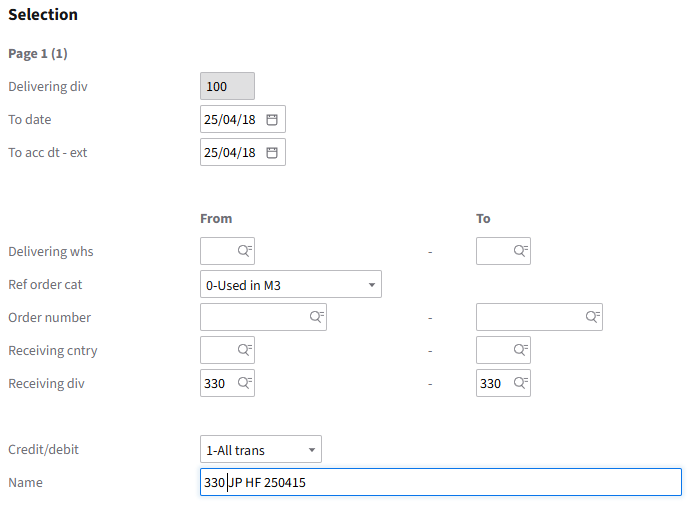
Please note:
You will get items for both High Flex and PG in the proposal so have to set ON HOLD for items that should not be
Was this article helpful?
That’s Great!
Thank you for your feedback
Sorry! We couldn't be helpful
Thank you for your feedback
Feedback sent
We appreciate your effort and will try to fix the article