Customer Information | |
Country | China (HF Spare Part Distribution) Order number 0007.. with “mottagare” 71A on pickinglist |
Customer Name | Mycronic (Shanghai) Co.,Ltd. |
Delivery Address | Unit 102D, K Block, Lane 168, Da Duhe Road, Attn: Samson Shen
|
Customer Number Facility Warehouse | 8850 071 71A |
Contact Person | Samson Shen ,Gina Jin , Lucky Shu (Samson.shen@mycronic.com Gina.Jin@mycronic.com Lucky.Shu@mycronic.com) |
Email Address | collab-cn_logistics@mycronic.com |
Other information | Distribution orders are shipped on Mondays Global Spare parts liaise with China prior to shipment on what should be packed in which box and any other special instructions. |
Task | Complete (Y\N) | Notes |
Picking list received from warehouse, create a new folder in E:\50_Spares_Machines_Electronic_Filing\China\2020\Distribution and archive the picking list |
|
|
Manual Proforma Invoice can be found on \\miclaser\m$\Operations\Export\21_NEW_Country_Checklist\China Copy paste Part number, description, quantity (pcs), price and archive it in the folder.
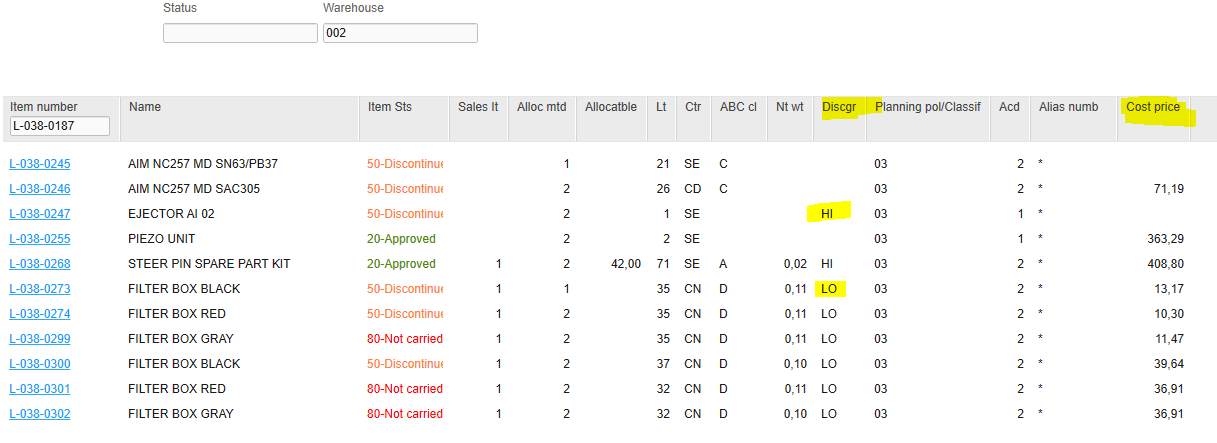
** Check MMS200 to see if low margin (LO) or high margin (HI) for pricing, and Country of Origin, see the picture on next page.
Shipping Terms = Exworks Täby If the following words are in the item description, create manual proforma and delete every word except these: Cables Motors PM Kit Monitors Computers Barcode scanner SW Säkringar ( fuses ) får ej nämnas på leveransfakturan, använd spare part for pattern generator.
|
|
|
Book DHL shipment using Mycronic’s China DHL import account number 951916690. (For DHL – Write “Samson” in Name field, choose address with “951916690” on). Print the DHL airway bill to Brest, and save as pdf in the folder in Export / 50_Spares_Machines_Electronic_Filing. |
| Note – do not tick in box for pallets in DHL booking (CN DHL account does not allow pallet shipping, but it still works to deliver pallets)
|
Attach Proforma when booking DHL automatically in the booking. If not possible to attached Proforma in DHL booking, send the DHL airway bill and the Proforma or Invoice to sefaktura @dhl.com and cc Gina Jin & Lucky Shu. Email subject, write “DHL airway bill tracking number XX”. (the tracking number is found on the airway bill). |
|
|
Adding the freight value on separate excel file. See the total weight and charge breakdown in the shipment receipt |
|
|
Send inspections reports for Cartridges to Gina or Lucky. Reports can be found on the export folder 50, under CARTRIDE doc. If not found send a request to Senju Metal Industry Co., Ltd., Sunamori,Erika esunamori@senju.com.
For report for L-038-0187 send a request to okoshi@almit.co.jp (Supplier: ALMIT) Or ask SH-SE-Logistics logistics@mycronic.com. |
| If requested |
Archiving all documents to China folder |
|
|
Internal Invoicing |
|
|
Customer Information | |
Country | China (HF Customer Order, Service Orders, Demo orders*** Order number 002.. on pickinglist |
Customer Name | Mycronic (Shanghai) Co.,Ltd. |
Delivery Address | Mycronic (Shanghai) Co.,Ltd. Unit 102D, K Block Lane 168, Da Duhe Road. Putuo District, 200062 Shanghai, CHINA |
Customer Number | 8850 |
Contact Person | Samson Shen , Gina Jin |
Email Address | Samson.shen@mycronic.com Gina.Jin@mycronic.com Lucky.Shu@mycronic.com |
Other information | Before to make a shipment, check in Order Tracker at Trade Compliance at TEAMS, that the order is approved for shipping! Send a mail to SH-SE-Compliancecheck compliancecheck@mycronic.com to check approval. Unless instructed ALL Orders ship direct to Mycronic Shanghai, even if another customer name and address on the plock lista. Export Coordinator email China prior to shipment on what should be packed in which box and any other special instructions. |
Task | Complete (Y\N) | Notes |
Picking list received from warehouse, create a new folder in E:\50_Spares_Machines_Electronic_Filing\China\2020\Distribution and archive the picking list.
Create Proforma for a Distribution order number in M3:
|
|
|
Email Mycronic Shanghai list of parts due to ship if several items, hold until approved |
|
|
If the Customer name is NOT Mycronic Shanghai, Follow trade compliance process, contact Trade Compliance or China and ask if the spare part order is approved.
|
|
|
Create Manual Proforma Invoice ** check MMS200 to see if low margin (LO) or high margin (HI for pricing, see the picture on next page. Shipping Term = exworks Täby **If manual proforma is required, check MMS200 to see if low margin (LO) or high margin (HI for pricing, see the picture on next page. Shipping Term = exworks Täby If the following words are in the item description, create manual proforma and delete every word except these: Cables Motors PM Kit Monitors Computers Barcode scanner SW Säkringar ( fuses ) får ej nämnas på leveransfakturan, använd spare part for pattern generator.
|
|
|
Book the shipment with DHL using our account. (For DHL – Write “Samson” in Name field, choose address with “958204372” on). Always write the measurements and weight Print the DHL Transport Label to Printer “Brest”, and save as pdf in Export / 50_Spares_Machines_Electronic_Filing. |
|
|
Attach Proforma when booking DHL automatically in the booking. If not possible to attached Proforma in DHL booking, send the DHL airway bill and the Proforma or Invoice to sefaktura @dhl.com and cc Samson Shen & Gina Jin Email subject, write “DHL airway bill tracking number XX”. (the tracking number is found on the airway bill). |
|
|
Adding the freight value on separate excel file. See the total weight and charge breakdown in the shipment receipt |
|
|
Save inspections reports for Cartridges in the folder . Reports can be found on the export folder 50, under CARTRIDE doc. If not found send a request to Senju Metal Industry Co., Ltd., Sunamori,Erika esunamori@senju.com. For report for L-038-0187 send a request to okoshi@almit.co.jp (Supplier: ALMIT) Or ask SH-SE-Logistics logistics@mycronic.com. |
|
|
Archiving all documents to China folder |
|
|
Internal Invoicing at end of month |
|
|
***Demo order for MY CN internal use are placed basing on a mail from MY CN office: Enter items, prices will come automatically. Mark all the line, right click and type Change. Change the price as copying the one from Net Price to Sales Price. And delete figure from “Disc%” at Discounts. Then Press Enter. MY CN want the final prices on the Invoice, not showing discounts.
For Hermes Taiwan China (Dora) places order, write the prices as in the PO, sometimes you have to change delivery term in OIS100. 8729 as the customer code |
| If UPS booking and they have account number, choose “Bill the receiver” on 6 and type the account number and their postal code that is found on the address. |
- ZOLLNER – returns, claims.
Are always sent basing on Shipment request form that Claims department is filling in and together with the goods leaving at the warehouse for packing. They write price on top of the claim order document they sent to us. Create a proforma, manual Zollner_Suppler Return is found on E:\21_NEW_Country_Checklist\China, convert the price to USD and write RMA, order number, the items and today’s date as Invoice date and Invoice no.
Terms of payment “Free of charge”, Prices for customs purposes only. Prices are stated on the Request form.
Book DHL and send Proforma and DHL AWB number to Helen Wei Helen at Zollner, e-mail: Haitang_Wei@zollner.de. CC Johan Andersson.
Old version of creating Proforma for DO’s:
- How to raise Qlikview Proforma invoice is shown below
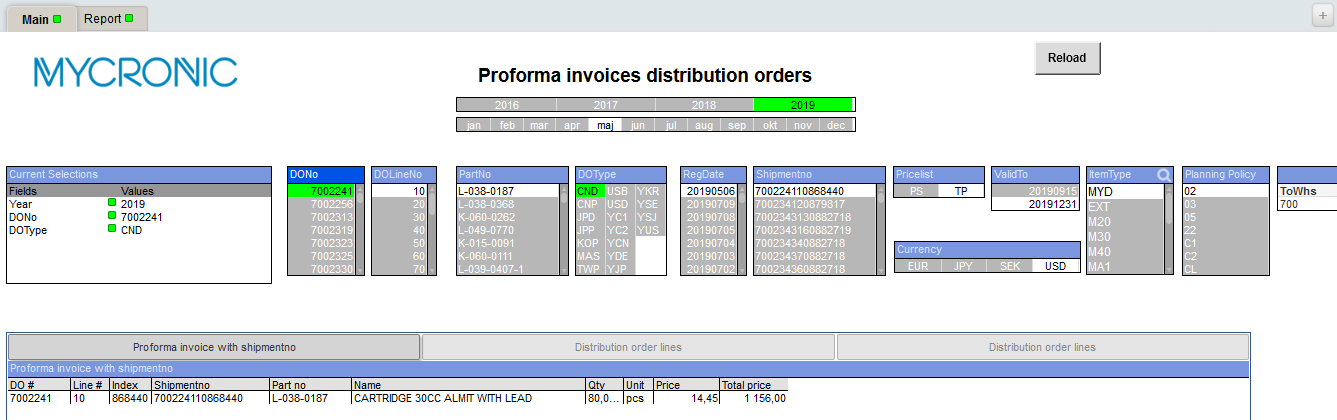
If you need to select several order numbers, press and hold in Ctrl-button
Select “report”
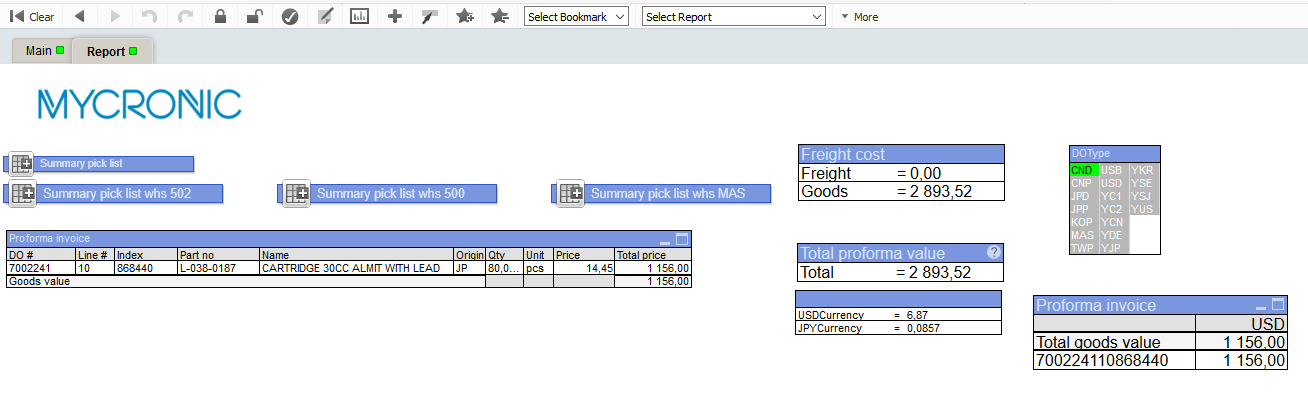
- Change the Goods on the freight cost to total price and press enter
- On “Select Report”, choose Summary Proforma Invoice and save it as pdf
**To calculate the price for Manual pro forma invoice
- Check if LO or HI margin on MMS200
- Check the Sales Price OIS017, TP- USD
- If its High Margin, Multiply the sales price with 0.7
- If its Low Margin Multiply the sales price with 0.85
- From home page select QlikView from Mycronic applications list. Click on Proforma invoices distribution orders.qvw.
- Select and hold – ToWHS and Country code (700 / CN) at the same time.
- Choose “Proforma invoice with shipmentno”. Right click, Send to XLS.
Manual Proforma Invoice can be found on \\miclaser\m$\Operations\Export\21_NEW_Country_Checklist\China
Copy paste Part number, description, quantity (pcs), price and archive it in the folder.
Was this article helpful?
That’s Great!
Thank you for your feedback
Sorry! We couldn't be helpful
Thank you for your feedback
Feedback sent
We appreciate your effort and will try to fix the article